

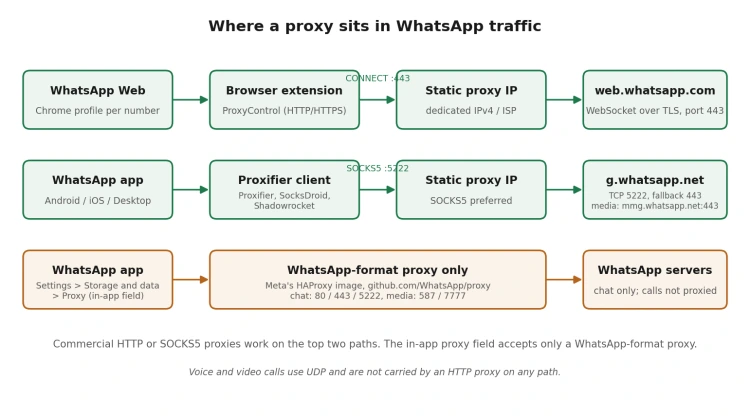
WhatsApp added its own proxy setting in January 2023 (Settings, Storage and data, Proxy), and that one field causes most “my proxy doesn’t work with WhatsApp” support tickets. It accepts only a proxy built from Meta’s HAProxy image in the WhatsApp/proxy repository on GitHub, listening on ports 80, 443 and 5222 for chat and 587 or 7777 for media. Paste a commercial HTTP or SOCKS5 proxy into it and the app never connects.
So the question of the best proxies for WhatsApp has two answers depending on where the proxy sits. If WhatsApp is unreachable from your network, you need a WhatsApp-format proxy, and none of the providers below sell one. If you run WhatsApp Business numbers from a browser or desktop and want each number tied to a stable IP in the right country, you need a static proxy with a clean address.
The cost of getting it wrong is mundane. A support desk loses its WhatsApp Web session when the WebSocket to web.whatsapp.com drops for more than a few minutes, and every re-link means scanning a QR code on the phone again. Across five numbers, a $2 proxy becomes the most expensive cheap component in the stack.
What a WhatsApp proxy actually has to carry
Three traffic paths matter. The mobile app keeps a long-lived TCP connection to g.whatsapp.net on port 5222 and falls back to 443 when 5222 is filtered; media goes to mmg.whatsapp.net over 443. WhatsApp Web and the desktop client use a WebSocket over TLS to web.whatsapp.com on port 443. Calls use UDP, which an HTTP proxy cannot carry and a SOCKS5 proxy carries only with UDP associate support, which most extensions and proxifiers lack.
The browser path is the simplest: an HTTP(S) proxy with CONNECT support handles WhatsApp Web without extra software, and an extension binds one proxy to one browser profile. The desktop and phone apps have no field for a standard proxy, so they need a proxifier: Proxifier on Windows and macOS, SocksDroid on Android, Shadowrocket on iOS. All of them work best with SOCKS5, because an HTTP proxy tunnels port 5222 only if the provider permits CONNECT to non-standard ports.
Bandwidth is not the constraint. A text-chat session moves a few megabytes an hour, so per-gigabyte residential plans built for scraping are the wrong pricing model; you are paying for an IP that stays put.
Datacenter, ISP, mobile or rotating residential proxies for WhatsApp
Most rankings of WhatsApp proxies repeat one line: mobile is best, residential second, never use datacenter. That merges two problems. Registering a brand-new number is where IP reputation is examined hardest, and a fresh mobile or ISP address does reduce friction there. Keeping a verified business number online for months is a different job, and a dedicated datacenter IPv4 that never changes, sits in the number’s country and was not abused by a previous tenant does it reliably at a fraction of the price.
Rotating residential pools are the actual mistake. A pool that changes the exit IP every 10 or 30 minutes forces the WebSocket to reconnect from a new address each time, and WhatsApp Web answers with “Retrying”, sometimes followed by a forced re-link. Sticky sessions of up to 24 hours reduce the problem. A static IP removes it, which is why the best proxies for WhatsApp sessions are static ones.
| Proxy type | IP stability | Typical price per IP, month | Added latency, same region | Best WhatsApp use | Main weakness |
| Dedicated datacenter IPv4 | Static until cancelled | $0.70 to $2.50 | 5 to 40 ms | Long-running WhatsApp Web sessions on verified numbers | Datacenter ASN is visible; a previously abused IP arrives pre-flagged |
| ISP (static residential) | Static | $1.30 to $4.00 | 5 to 40 ms | Numbers that need a consumer ISP ASN in the US, UK or Germany | Short country list; entry tiers often shared by 2 to 3 users |
| Mobile 4G/5G, dedicated | Static per SIM, rotated on request | $25 to $120 | 40 to 120 ms | Verifying a new number; mobile-only testing | Cost; carrier NAT shares the IP with thousands of handsets |
| Rotating residential, per GB | Changes per request or sticky window (10 min to 24 h) | $1.50 to $8 per GB | 100 to 300 ms | Short geo checks, not sessions | Every IP change risks a reconnect or re-link |
| Shared datacenter IPv4 | Static, 2 to 3 tenants | $0.30 to $0.70 | 5 to 40 ms | Testing before buying dedicated IPs | Neighbouring tenants shape the reputation of your IP |
The best proxies for WhatsApp in 2026, ranked
The best proxies for WhatsApp below are weighed on four things in this order: whether the IP is static, country coverage for static IPs, entry price per IP with a small minimum order, and tooling for pinning one IP to one browser profile. Prices are the lowest published tiers as of September 2026 and change often.
1. Proxys.io (dedicated IPv4 from $1.47, one-IP minimum)
 Proxys.io sells individual IPv4 addresses in 25 countries, including the United States, the United Kingdom, Germany, France, Poland, Brazil and Australia, from $1.47 per IP per month, with HTTP, HTTPS and SOCKS5 on the same credentials. There is no bundle minimum, so a team running three WhatsApp Business numbers buys exactly three IPs. A Premium IPv4 tier at $3.60 extends coverage to 195+ countries.
Two details put it first for WhatsApp Web. The ProxyControl extension for Chrome, Opera, Yandex Browser and Firefox (version 1.4.7, roughly 50,000 Chrome users) imports the proxy list through an API key, whitelists domains and switches addresses with a hotkey: exactly the per-profile binding a session needs. And the “Individual IPv4 with Windows OS” option ($1.87, Russia and Spain) presents a Windows TCP/IP stack signature, so a browser reporting Windows in its user agent is not contradicted by a Linux fingerprint at the transport layer.
The limitations are real. Mobile and residential IPs are offered for Russia only, so a Tier-1 mobile address has to come from elsewhere, and there is no per-gigabyte residential pool. The extension handles HTTP(S) only; SOCKS5 for the desktop app still goes through Proxifier.
2. Proxy-Seller (datacenter IPv4 from $0.70, mobile from $25)
 Datacenter IPv4 starts at $0.70 per IP in mixed-country bundles and $0.90 for a single country across 38+ countries, ISP addresses from $1.50 in 23 countries, and dedicated mobile proxies from $25 to $80 on SIM cards from Vodafone, T-Mobile and Orange. The mobile tier is the reason to pick it when a new number must be verified from a carrier address.
3. IPRoyal (dedicated datacenter from $1.39, ISP from $2.40)
 Dedicated datacenter proxies cost from $1.39 per IP on the 90-day plan and ISP addresses from $2.40 per IP per month, both with unlimited bandwidth and SOCKS5. Stock in some ISP locations runs out; for a handful of static IPs in the US or UK it is dependable.
4. Webshare (ISP from about $0.30 per IP, 20-IP minimum)
 ISP proxies start at $6 per month for 20 shared IPs, and 10 datacenter proxies are free. Coverage is roughly a dozen countries with the United States dominating. It suits a team testing a WhatsApp Web setup for the price of a sandwich, less so one that needs a specific European country.
5. Decodo, formerly Smartproxy (dedicated ISP from $9.99 for 3 IPs)
 The dedicated ISP plan begins at $9.99 for three IPs with unlimited traffic, and sticky sessions on ISP addresses have no duration limit. The dashboard is the most beginner-friendly here, but per-IP cost is roughly double Proxys.io or Proxy-Seller.
6. Bright Data (dedicated ISP at $4 per IP, widest targeting)
 ISP proxies come as pay-per-GB at $18.75, shared unlimited at $2 per IP and dedicated unlimited at $4 per IP per month, with a KYC check before use. It fits a regulated company that needs a compliance paper trail; for a five-number support desk it costs close to three times the leaders.
7. Oxylabs (ISP from $16 for 10 IPs, dedicated datacenter at $2.25)
 ISP proxies start at $16 per month for 10 IPs, falling to $1.15 per IP at 1,000, and dedicated datacenter proxies cost $2.25 per IP. Entry-tier ISP addresses are shared by up to three users, the mobile pool is billed per gigabyte with automatic rotation, and trials go through sales rather than self-service.
| Provider | Static IP types | Entry price per static IP, month | Countries, static IPs | Protocols | Minimum order | Browser tooling |
| Proxys.io | Dedicated, shared, Windows-fingerprint and Premium IPv4 | $1.47 (shared $0.67, Premium $3.60) | 25 standard, 195+ Premium | HTTP, HTTPS, SOCKS5 | 1 IP | ProxyControl with API import |
| Proxy-Seller | Datacenter IPv4, ISP, mobile | $0.70 mix, $0.90 single country, ISP $1.50 | 38+ datacenter, 23 ISP | HTTP(S), SOCKS5 | 1 IP | Own extension |
| IPRoyal | Datacenter, ISP, mobile | $1.39 datacenter, $2.40 ISP | 30+ ISP | HTTP(S), SOCKS5 | 1 IP | Own extension |
| Webshare | Datacenter, ISP | About $0.30 ISP (shared) | About 12 | HTTP(S), SOCKS5 | 20 IPs (ISP) | Own extension |
| Decodo | ISP, datacenter | $3.33 dedicated ISP | 17+ | HTTP(S), SOCKS5 | 3 IPs | Own extension |
| Bright Data | ISP, datacenter | $4.00 dedicated ISP, $2.00 shared | Widest pool | HTTP(S), SOCKS5 | Deposit-based | Proxy Manager |
| Oxylabs | ISP, dedicated datacenter | $1.60 ISP (shared by up to 3), $2.25 datacenter | US-heavy ISP | HTTP(S), SOCKS5 | 10 IPs (ISP) | Own extension |
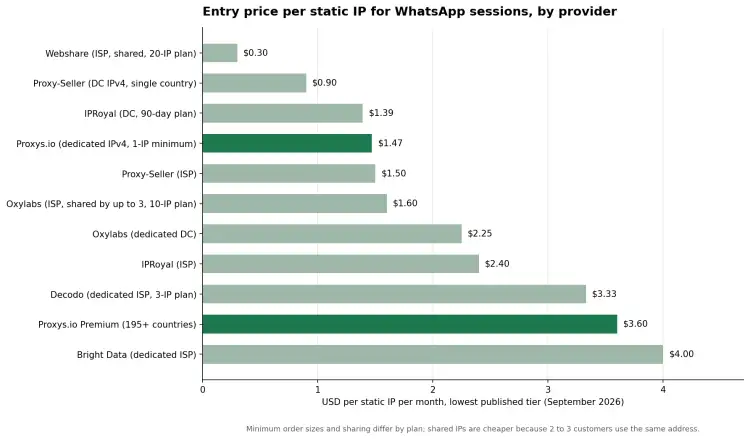
Read the chart with the minimum order in mind. Webshare’s $0.30 requires 20 shared IPs, so the cheapest way to run two numbers on your own addresses is a two-IP order at Proxy-Seller or Proxys.io, at $1.80 to $2.94 a month. The best proxies for WhatsApp are the cheapest per number, not per unit.
How to set up a proxy for WhatsApp Web, step by step
- Buy one static IP per WhatsApp number, in the country where that number is registered, and copy the host, port, login and password from the dashboard.
- Create a separate browser profile for each number. Proxy settings are stored per profile, which stops IPs from crossing between numbers.
- Install ProxyControl or your provider’s extension in that profile, add the proxy manually or import it with the API key, and whitelist web.whatsapp.com if only WhatsApp should use the proxy.
- Load browserleaks.com/ip and confirm that the IP, country and time zone shown belong to the proxy and that WebRTC does not expose the real address.
- Open web.whatsapp.com and link the browser from the phone (Linked devices, Link a device). The phone can stay on its normal mobile connection.
- Leave the profile open and do not toggle the proxy while the session is active. If an IP must change, log out first, switch, then link again.
For the desktop app, replace step 3 with a Proxifier rule that sends WhatsApp.exe to the SOCKS5 proxy. On Android, use SocksDroid with the per-app list restricted to WhatsApp; a Wi-Fi proxy in Android’s network settings does not apply to WhatsApp’s socket.
Why WhatsApp sessions drop behind a proxy, and what fixes them
Geo mismatch is the most common cause. A UK number linked through a US IP still works, but WhatsApp treats the location as new, and on some accounts the linked device is signed out after a few days. Match the proxy country to the number’s country code; for a Polish number that means a Polish IP, which Proxys.io and Proxy-Seller sell and Webshare does not.
Port handling causes the silent failures. An HTTP proxy that refuses CONNECT to port 5222 leaves the phone app on “Connecting” with no error, because the app tries 5222 first and falls back to 443 only later. Switch the proxifier to SOCKS5 with remote DNS resolution (socks5h in curl terms) so that g.whatsapp.net is resolved by the proxy, not the phone.
Shared addresses fail slowly. A $0.67 shared IPv4 at Proxys.io is fine for a week of testing, but two or three tenants share its reputation and you never see what they do with it. IPv6 at $0.13 is not a shortcut either: most proxifiers tunnel IPv4 only, and the reputation history of an IPv6 /64 is thin.
When to change your WhatsApp proxy provider
An IP replaced without notice means every session on it must be re-linked. Sessions dropping weekly on a static IP point to oversold upstream. Support that answers in days rather than minutes matters more here than in scraping, and a provider that sells only bundles of 10 or 20 makes you pay for idle addresses.
Proxys.io scores well on those signals: one-IP orders, HTTP and SOCKS5 on every address, an API for pulling the list into the browser extension, and live-chat support. It scores poorly on Tier-1 mobile IPs and per-gigabyte residential traffic; Proxy-Seller or IPRoyal fills that gap in the same price band.
Related reading
The full ProxyControl walkthrough, including API-key import, whitelists and hotkeys, is in How to set up a proxy in the Proxy Control extension.
Frequently asked questions
Which are the best proxies for WhatsApp Business?
For a verified business number, a dedicated static IPv4 or ISP address in the number’s country, kept for the life of the number, gives the most stable sessions per dollar. Mobile proxies earn their price at registration time, not in daily use.
Can I use a free proxy for WhatsApp?
Free public proxies are shared by hundreds of unknown users, change without notice and usually block CONNECT to port 5222, so the phone app never connects and WhatsApp Web sessions drop within hours. Webshare’s 10 free datacenter proxies work for short tests but are still shared addresses.
Is using a proxy with WhatsApp allowed?
WhatsApp ships its own proxy setting and publishes the server code, so routing a connection through a proxy is an expected use. What a proxy does not change is WhatsApp’s Business and Commerce Policies: messaging needs the recipient’s opt-in, and unofficial bulk-messaging clients remain prohibited whatever IP they connect from.
The practical recommendation for most teams is one dedicated static IP per verified number, in the number’s own country, bound to its own browser profile and left alone. At Proxys.io that costs $1.47 per number per month in 25 countries and $3.60 elsewhere; at Proxy-Seller $0.90 to $1.50. The expensive part of the best proxies for WhatsApp is never the IP but the re-link every time it changes, so the cheapest proxy is the one you never replace.